02 / Allied Universal

Bringing clarity to the world's largest security workforce

A four year UX effort in designing the AI-powered operational systems that move 750,000 security professionals through their day.

Role

  • Senior UX Designer

Timeline

  • 2020 — 2024

Platforms

  • Web
  • Mobile
  • AI Assistant
  • Dashboards

Focus Areas

  • Enterprise UX
  • AI Experiences
  • Workforce Management
  • Operations
  • Design Systems
Allied Universal logo
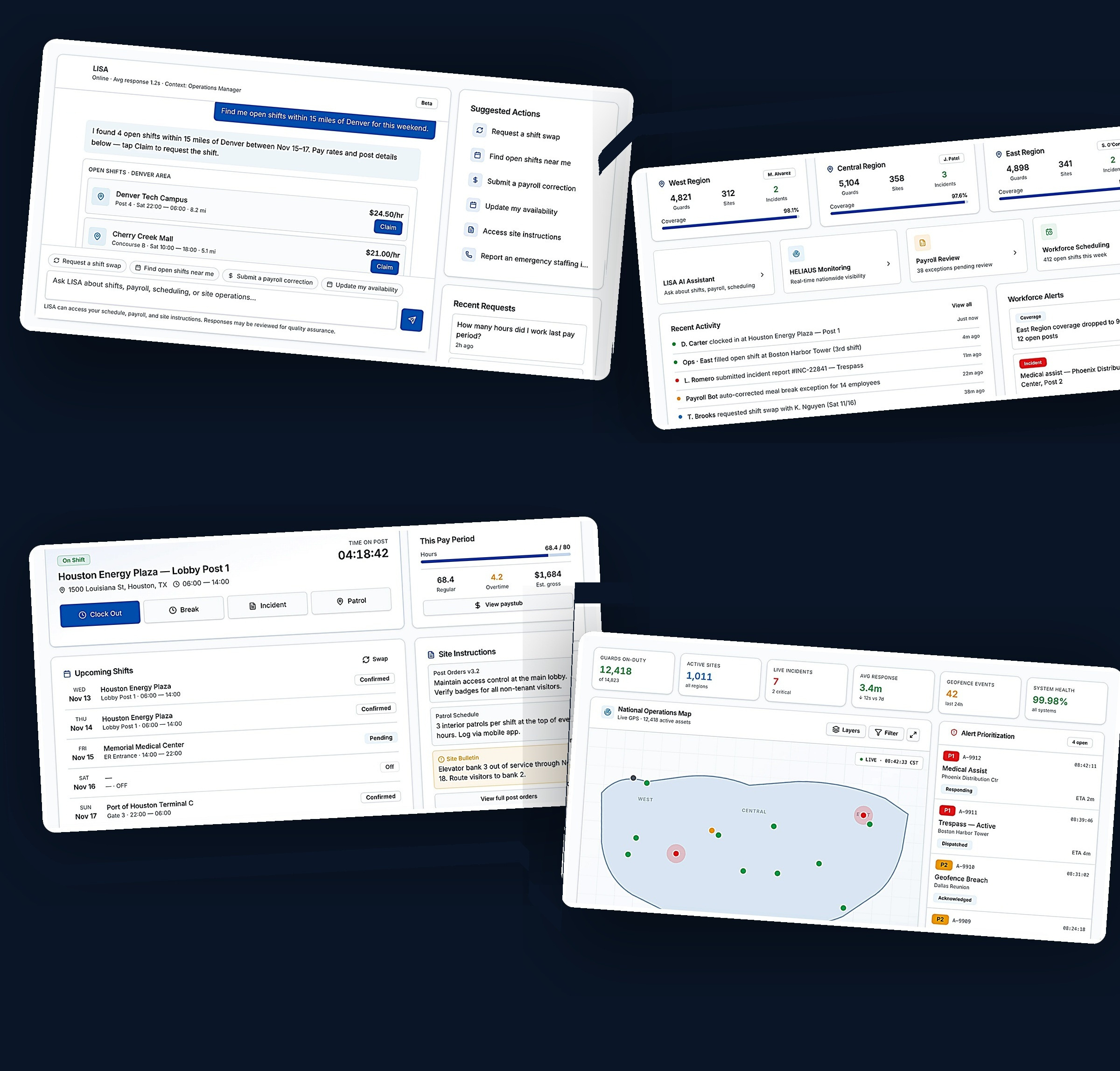
Collage of Allied Universal product screens including LISA AI Assistant, Security Guard Portal, Operations Manager Portal, and HELIAUS monitoring platform

01

A product ecosystem, not a product.

Overview

Allied Universal is one of the largest security services providers in the world, employing hundreds of thousands of security professionals across a diverse portfolio of client sites.

As the organization continued to grow, operational teams faced increasing pressure to manage workforce scheduling, payroll corrections, incident reporting, employee communications, and client requirements at scale. High employee turnover, complex scheduling requirements, and lean operational teams created significant challenges for both operations managers and field personnel.

Over a four-year period, I led UX initiatives across a suite of enterprise products designed to streamline workforce management, improve operational visibility, and reduce friction for both security guards and operations managers.

Products in the ecosystem

  • 01LISA AI Assistant
  • 02Security Guard Portal
  • 03Operations Manager Portal
  • 04HELIAUS Monitoring Platform

02

Two audiences. Two operating tempos.

Research & Discovery

To better understand operational challenges, I collaborated with stakeholders, operations teams, and field personnel throughout the design process. Research activities included:

Stakeholder Interviews

Workflow Analysis

Process Mapping

Product Audits

User Feedback Reviews

Requirements Gathering

Cross-functional Workshops

Security Guards

Responsibilities

  • Working assigned shifts across diverse client sites
  • Reporting incidents in real time
  • Coordinating with supervisors and dispatch

Goals

  • Easily manage their shift schedule
  • Get answers without waiting on a call
  • Resolve payroll and availability issues themselves

Pain Points

  • Information was fragmented — schedules, post orders, and pay details lived across multiple systems, emails, and phone calls
  • No self-service tools — guards had to wait on operations staff for answers they could have found themselves
  • Long response times from operations, especially mid-shift
  • Payroll correction requests often result in extensive back and forth messages as well as miscommunication

Typical Workflows

  • Check schedule → confirm arrival → follow post orders
  • Submit an incident → attach evidence → escalate
  • Request availability change → track approval
Operations Managers

Responsibilities

  • Scheduling and shift coverage across many sites
  • Payroll approvals and corrections
  • Client coordination and incident oversight

Goals

  • See coverage gaps and fill open shifts with the right people, fast
  • Keep clients confident and informed
  • Evaluate and approve payroll corrections without chasing paper trails

Pain Points

  • Routine tasks consumed the day — repetitive requests for schedules, payroll corrections, and site information
  • Reactive workflows driven by phone and email instead of a system of record
  • Fragmented information forced manual reconciliation across tools and spreadsheets
  • Limited visibility into workforce activity, staffing conditions, and performance across regions

Typical Workflows

  • Identify gap → find eligible guards → dispatch
  • Review payroll exceptions → correct → approve
  • Triage incident → assign owner → report to client

03

One interconnected ecosystem — four specialized products.

Designing the Solution

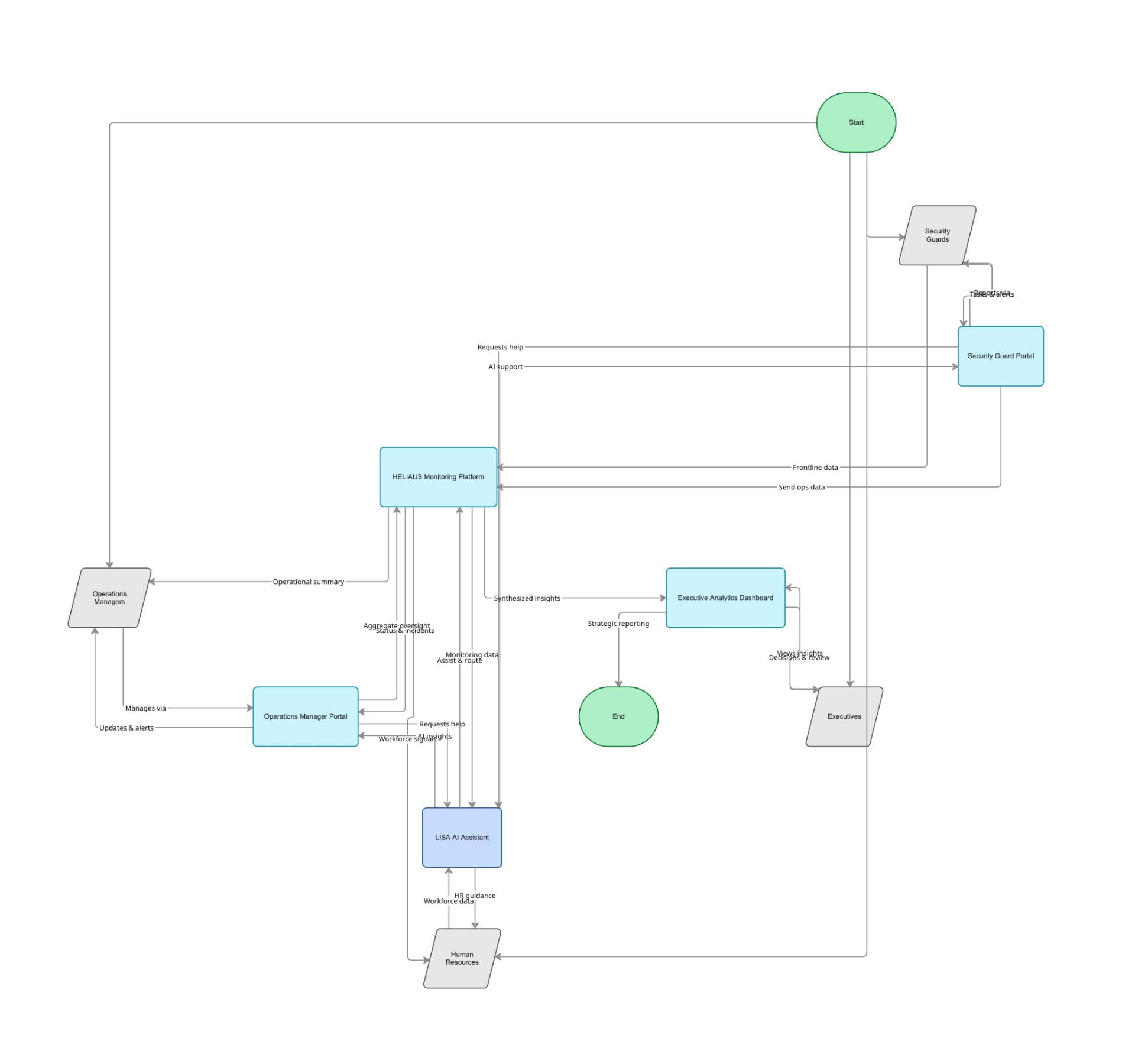
Rather than solving individual problems independently, we designed a connected ecosystem of products supporting different user groups across the organization.

Allied Universal information architecture diagram showing the interconnected ecosystem of LISA AI Assistant, Security Guard Portal, Operations Manager Portal, HELIAUS Monitoring Platform, Executive Analytics, and supporting user groups
Information architecture — ecosystem relationships and data flows

Product 01

LISA AI Assistant

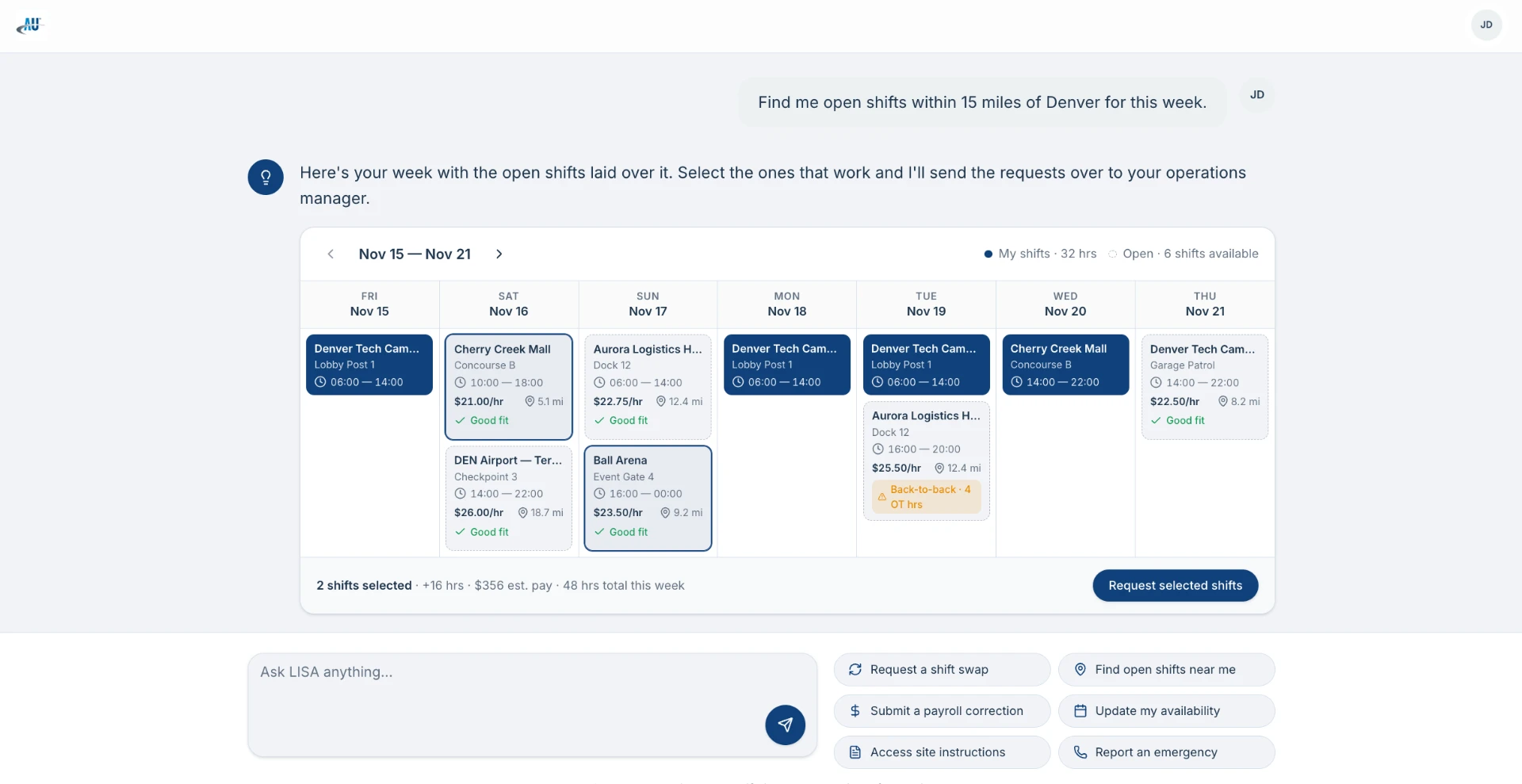
A conversational assistant that helps security personnel and operations managers resolve workforce requests through natural language — across web, mobile, and messaging surfaces.

lisa.aus.com/chat
LISA AI Assistant chat wireframe showing open shifts laid over a weekly schedule

Goal

Reduce operational workload by automating common workforce requests and providing self-service assistance to both security personnel and operations managers.

Solution

LISA was developed as a web, mobile, and conversational assistant experience capable of helping users navigate operational workflows through natural language interactions.

Capabilities

  • Scheduling assistance
  • Shift coverage
  • Payroll support
  • Site information
  • Policy guidance
  • Operational communications

During the product's evolution, the platform transitioned from rule-based NLP workflows toward more advanced LLM-powered experiences, creating opportunities for more flexible and natural interactions.

Design Decisions

Conversation Design

Turn-by-turn structure tuned for short, high-stakes exchanges in the field.

Information Architecture

A shared model of intents and entities mapped to operational domains.

Trust & Transparency

Every answer cites its source; every action states what will happen.

Error Handling

Graceful recovery patterns that hand control back to the user.

Task Completion

Optimized paths for the twenty requests that make up 80% of volume.

LISA AI Assistant flowchart showing conversation states, decision branches, and request handling paths across workforce workflows
LISA AI Assistant — conversation flow and decision logic

Product 02

Security Guard Portal

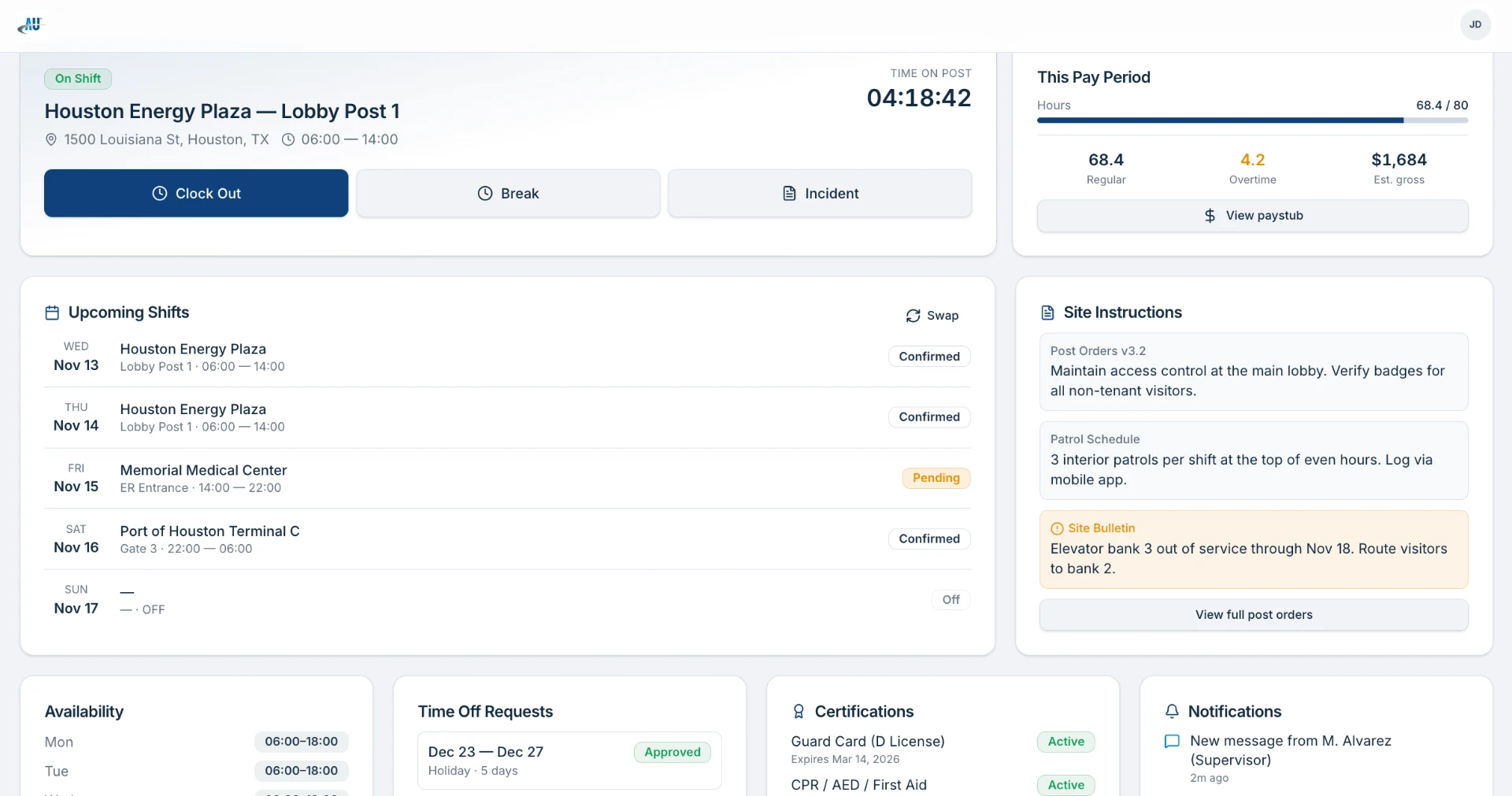
A mobile-first self-service portal where field personnel manage shifts, availability, site instructions, and certifications from wherever they are posted.

lisa.aus.com/guard/dashboard
Security guard dashboard showing active shift status, upcoming shifts, site instructions, and pay period summary
Active shift dashboard & upcoming shifts
lisa.aus.com/guard/paystub
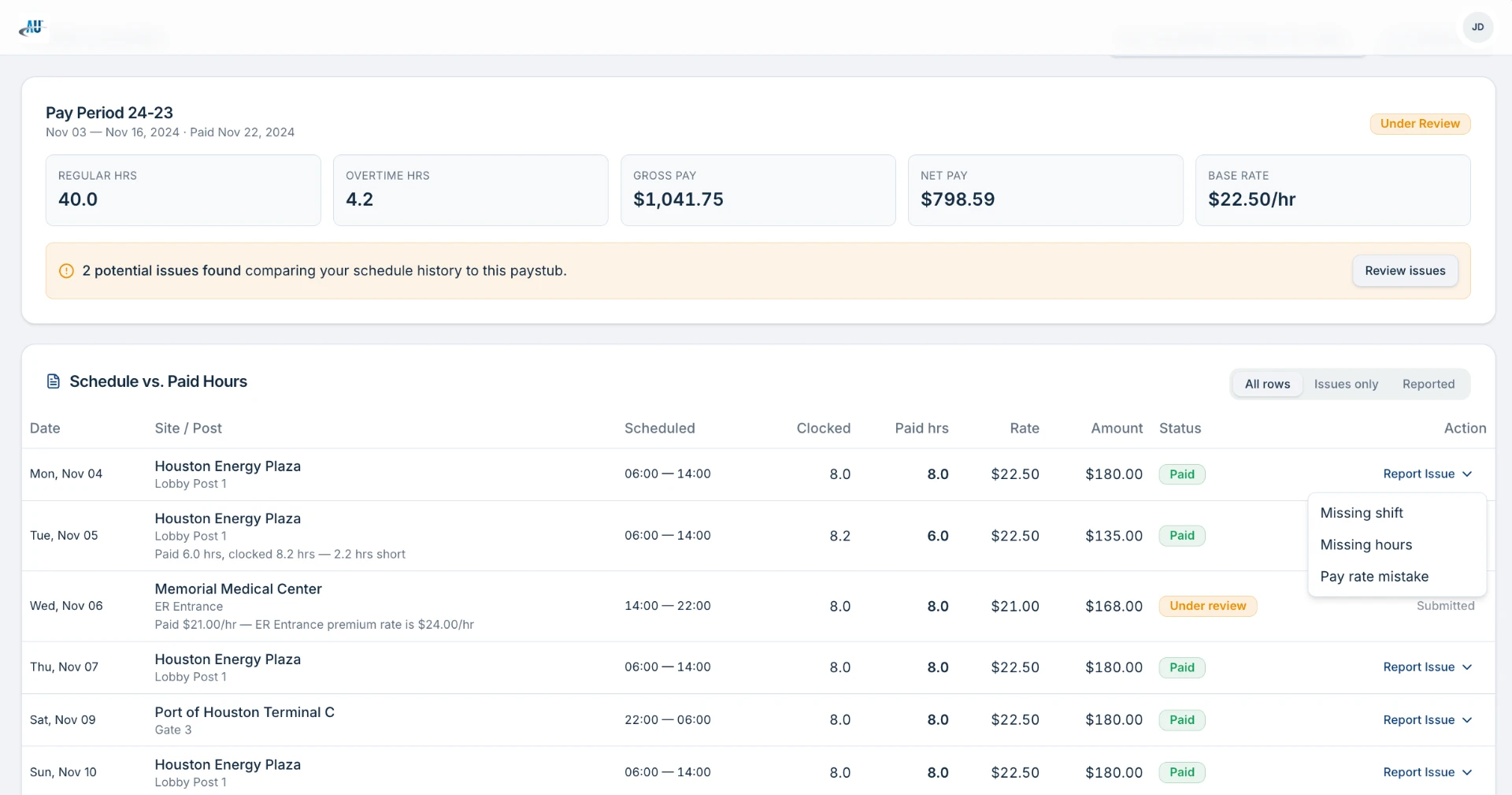
Pay period summary showing gross pay, net pay, regular and overtime hours, plus a schedule vs paid hours comparison table with issue reporting
Pay period review & schedule reconciliation
9:41
LISA
JD
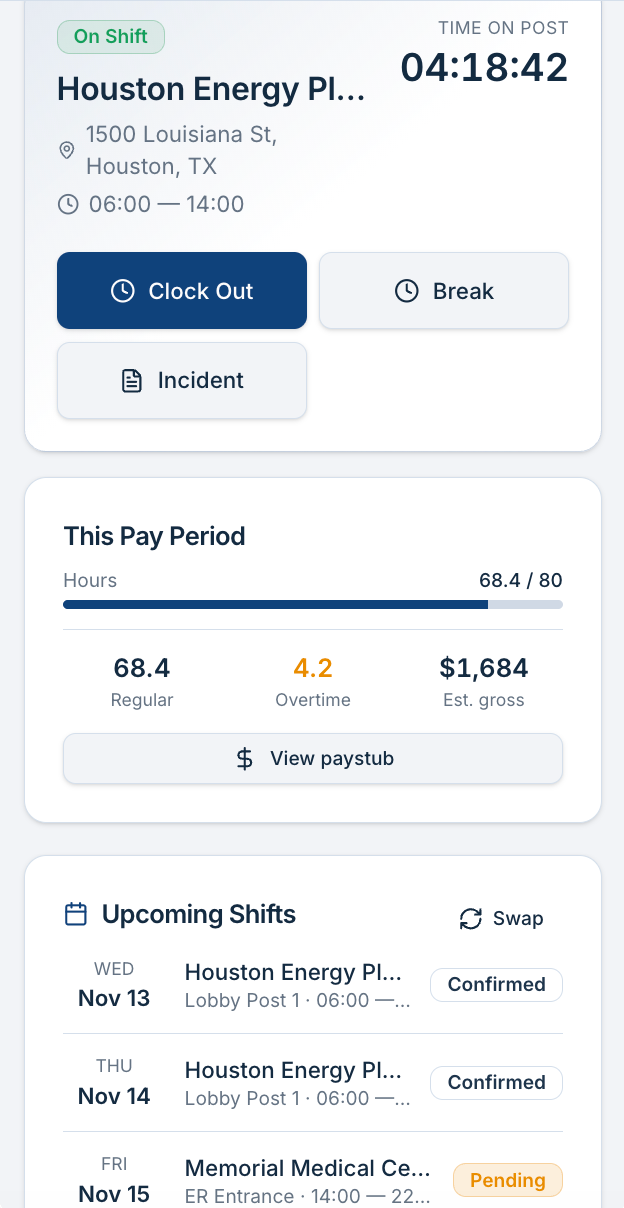
Mobile wireframe showing an active on-shift card with clock out, break and incident actions, pay period hours progress, and upcoming shifts with confirmed and pending statuses
Active shift, pay period & upcoming shifts
9:41
LISA
JD
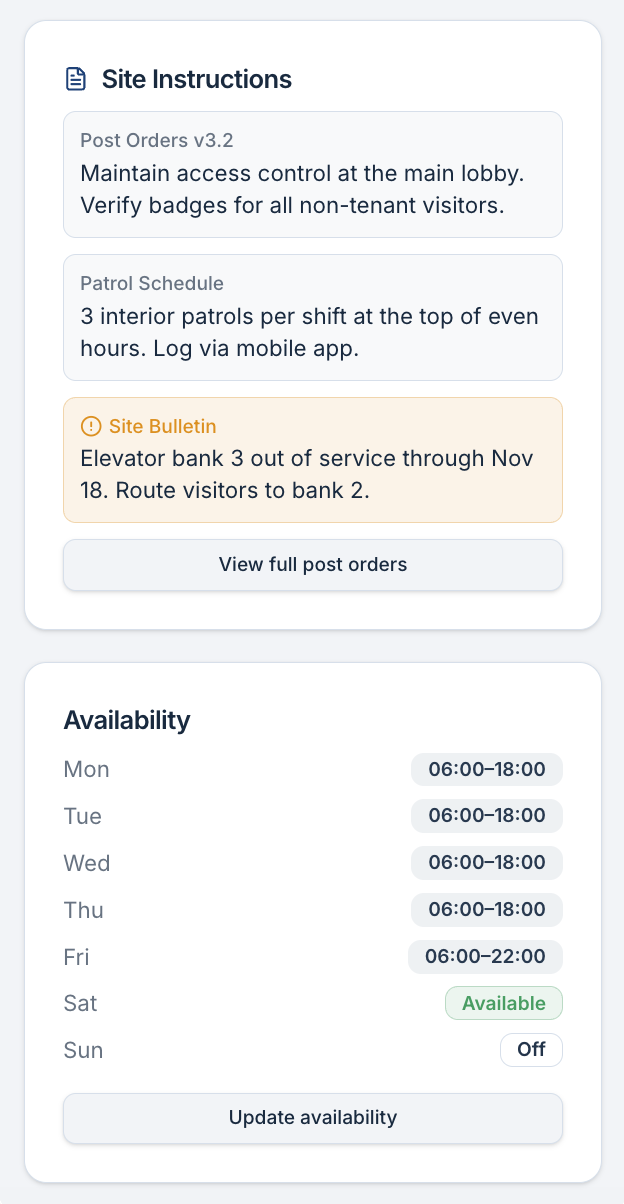
Mobile wireframe showing site instructions with post orders, patrol schedule, a site bulletin alert, and weekly availability settings
Site instructions & availability
9:41
LISA
JD
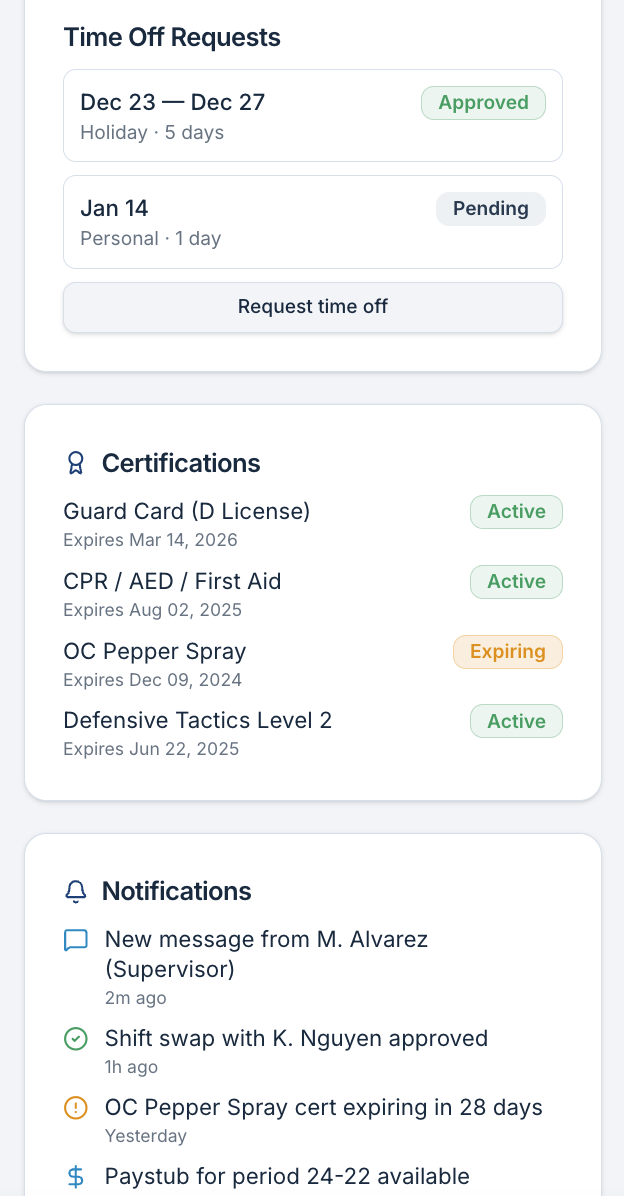
Mobile wireframe showing time off requests with approval statuses, certifications with expiry dates, and a notifications feed
Time off, certifications & notifications

Goal

Provide field personnel with a centralized self-service platform.

Solution

The portal enabled security guards to manage their working life from any device — with speed, clarity, and mobile accessibility as the guiding constraints.

Features

  • View schedules
  • Manage availability
  • Payroll corrections
  • Site instructions
  • Certifications
  • Operational communications
  • Incident reporting

The experience prioritized speed, clarity, and mobile accessibility for users frequently working in dynamic field environments.

Product 03

Operations Manager Portal

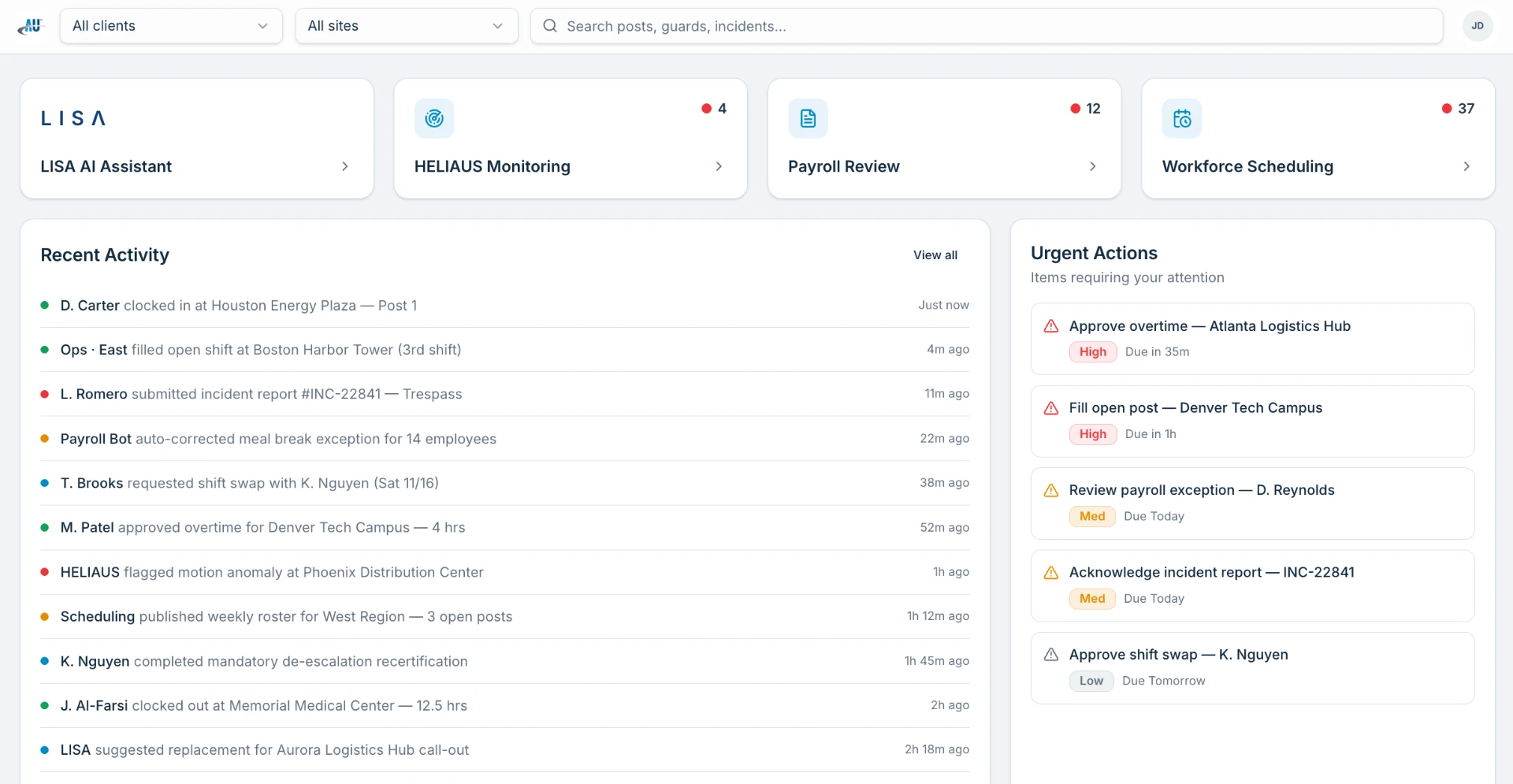
A decision-ready operational workspace: nationwide staffing signals, urgent actions, regional performance, and fast entry points into the tools managers use dozens of times a day.

lisa.aus.com/ops/overview
Operations manager overview showing LISA AI, HELIAUS, Payroll Review, and Workforce Scheduling quick-entry tiles, plus recent activity feed and urgent actions queue
Operational overview & quick entries
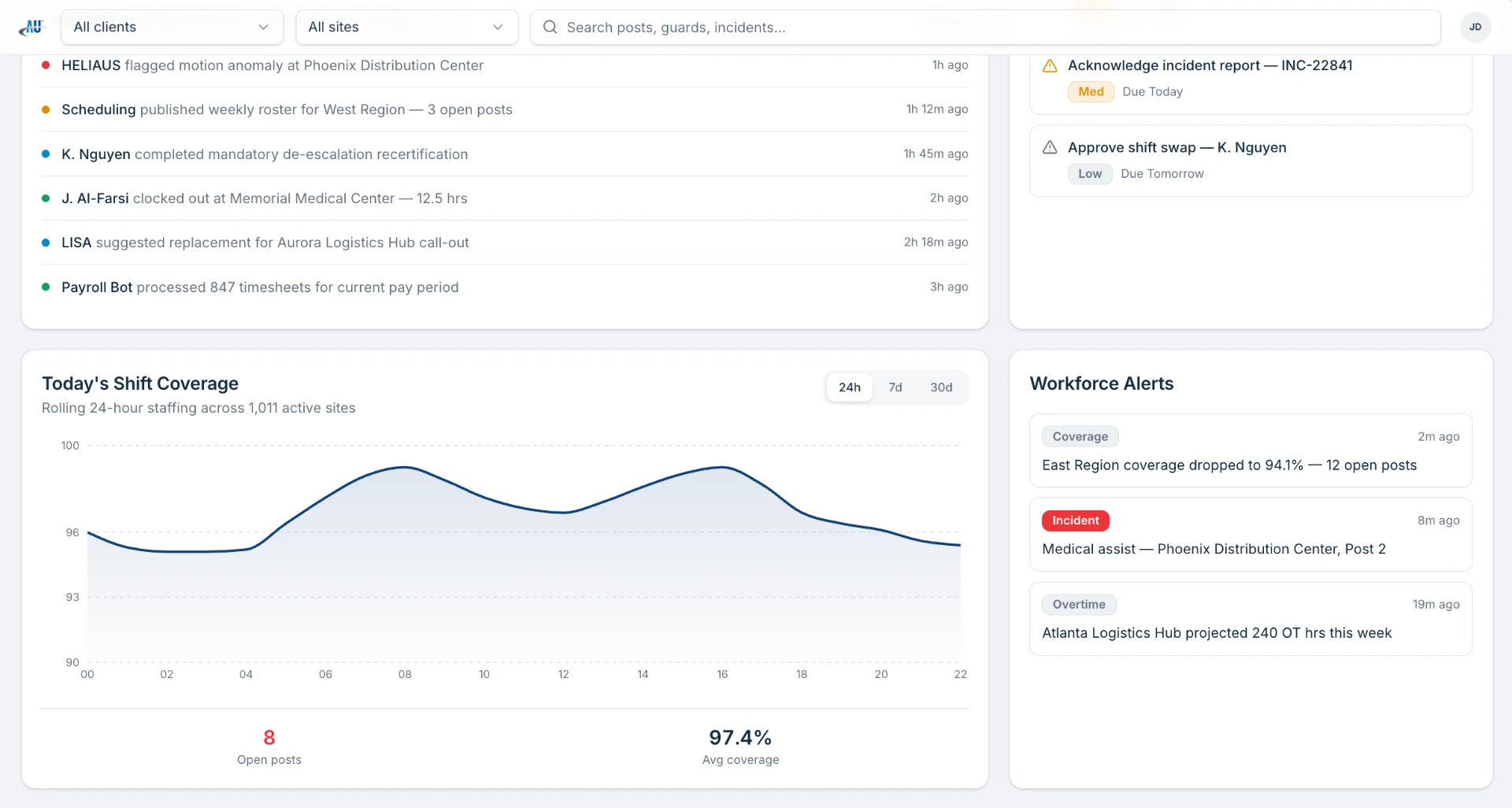
lisa.aus.com/ops/dashboard
Operations manager dashboard showing activity feed, today's shift coverage chart, open posts, average coverage, and workforce alerts
Operational dashboard & shift coverage
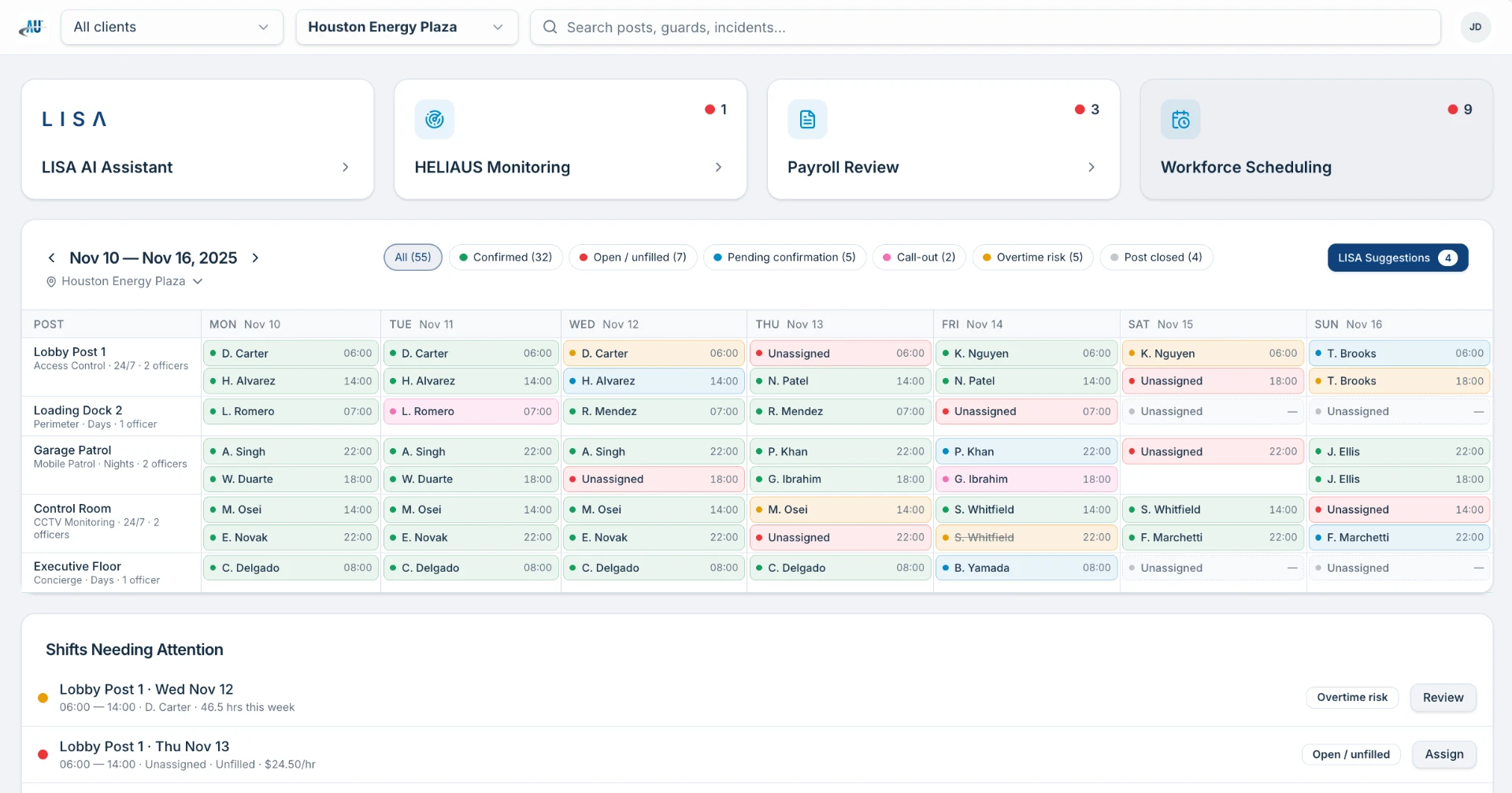
lisa.aus.com/ops/schedule
Operations manager scheduling wireframe showing weekly roster for Houston Energy Plaza, status filters, post assignments with officer names, and a Shifts Needing Attention list below
Weekly scheduling coverage & shift assignments
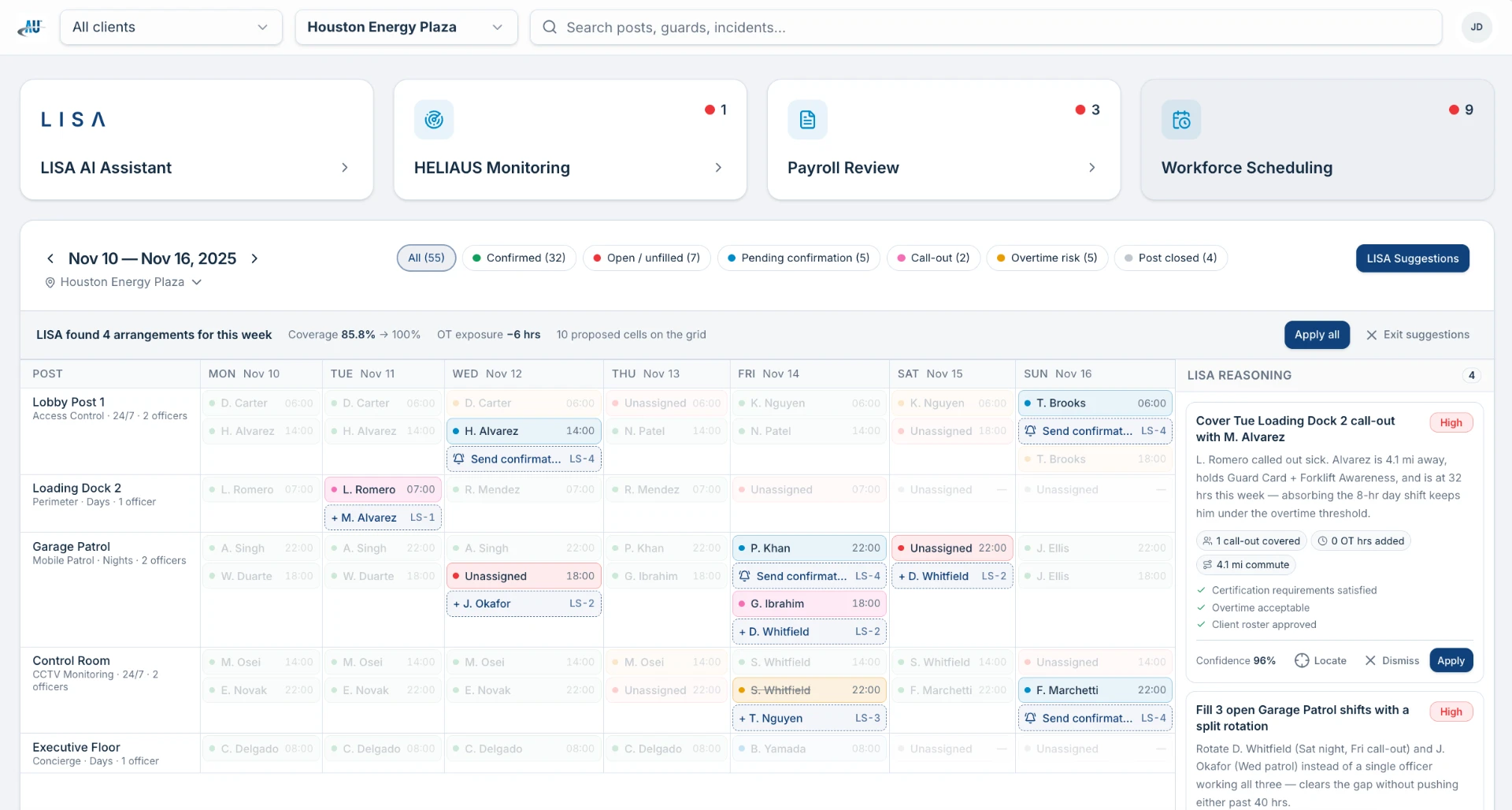
lisa.aus.com/ops/suggestions
LISA scheduling suggestions overlay showing proposed shift arrangements, coverage improvement from 85.8% to 100%, OT exposure reduction, and reasoning cards for each recommendation
LISA scheduling suggestions & coverage optimization

Goal

Centralize workforce management activities into a unified operational workspace.

Solution

A single, keyboard-friendly workspace that consolidates the tools an operations manager reaches for dozens of times a day.

What it supports

  • Scheduling
  • Assignments
  • Payroll
  • Employee oversight
  • Incident tracking
  • Client management

Design efforts focused on reducing cognitive load while supporting highly complex operational workflows.

Product 04

HELIAUS Monitoring Platform

Real-time operational awareness at national scale — live workforce positioning, prioritized alerts, and account health in one continuously updating view.

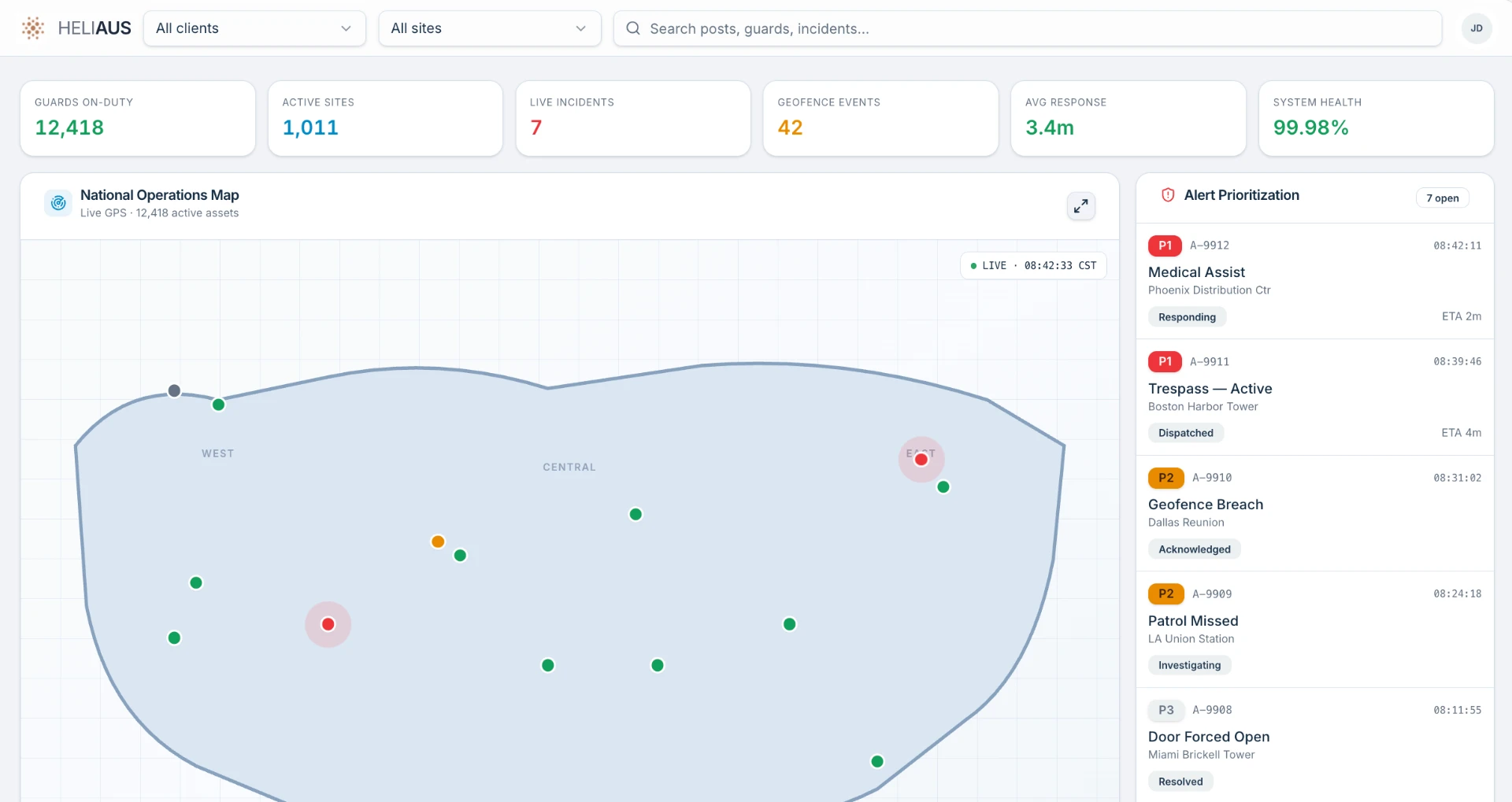
heliaus.aus.com/operations
HELIAUS operations map showing guards on duty, active sites, live incidents, geofence events, average response time, system health, and a prioritized alert queue with status and ETA
National operations map & alert prioritization
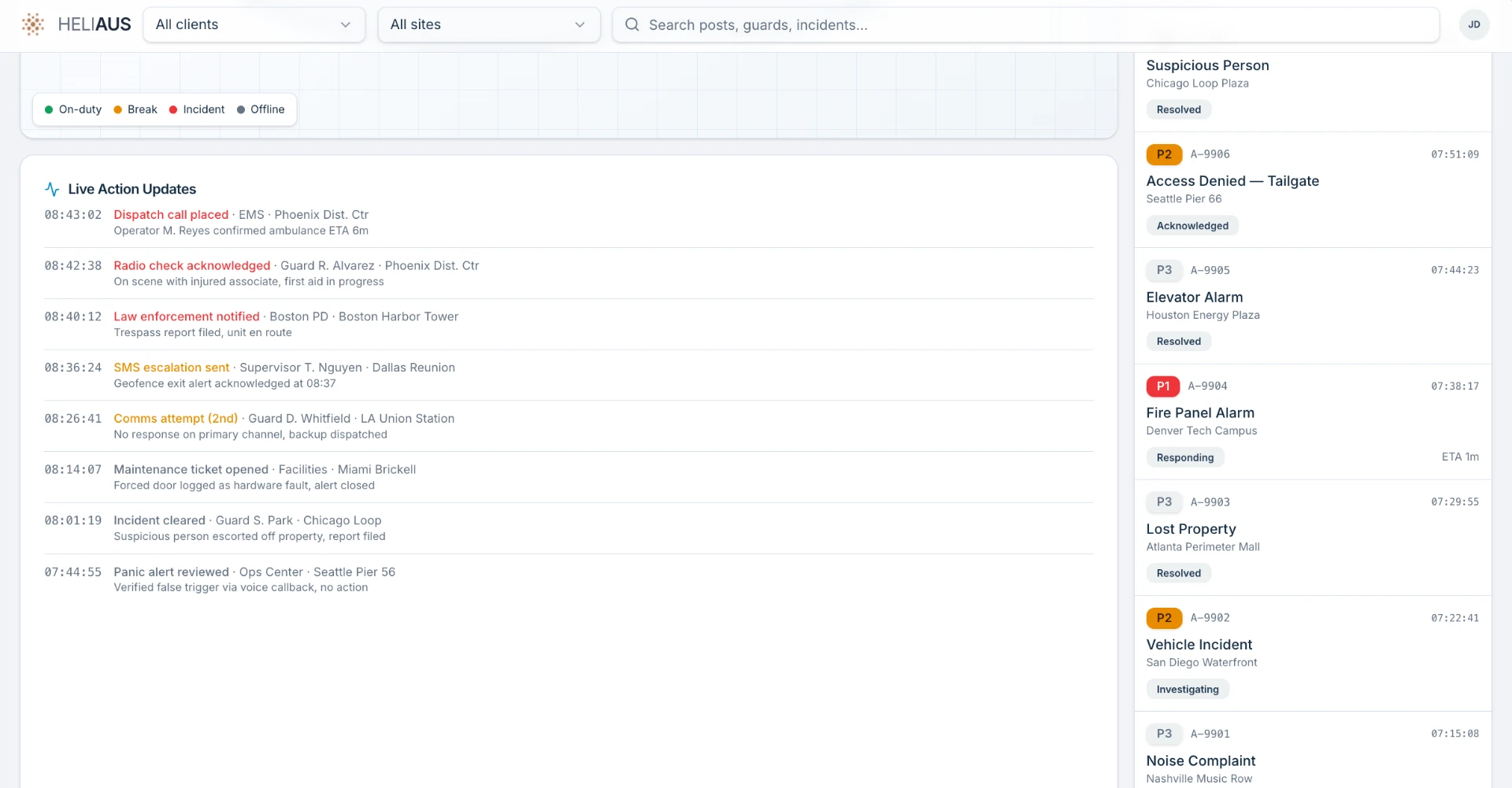
heliaus.aus.com/accounts
HELIAUS wireframe showing live action updates feed with timestamped dispatch, radio, law enforcement, and SMS events, plus a prioritized incident queue on the right
Live action updates & incident queue

Goal

Provide real-time operational awareness across distributed security operations.

Solution

HELIAUS gave operations teams a single pane of glass — live workforce activity, GPS positioning, and incident escalation across every region.

What HELIAUS delivered

  • Real-time monitoring
  • GPS visibility
  • Incident escalation
  • Nationwide visibility
  • Operational awareness

The platform helped operations teams quickly identify issues, monitor field activity, and coordinate responses across multiple locations.

08

What the ecosystem made possible.

Outcomes

The product ecosystem helped create more efficient pathways for workforce communication, operational coordination, and self-service support. By reducing friction across common workflows, the platforms enabled operations teams to manage increasingly complex workforce requirements while improving information access for field personnel.

The work also established a scalable foundation for future automation initiatives, AI-assisted workflows, and operational analytics capabilities.

01

Improved Operational Efficiency

Faster coordination across scheduling, payroll, and incident workflows.

02

Reduced Administrative Burden

Self-service pathways deflected routine requests away from operations teams.

03

Greater Workforce Visibility

Real-time, nationwide awareness of workforce activity and operational health.

04

Improved Self-Service

Field personnel resolved schedule, payroll, and site questions on their own.

05

Scalable Product Ecosystem

A shared foundation across four products supporting distinct user groups.

06

Foundation for AI Automation

Set the stage for LLM-powered workflows and AI-assisted operations.

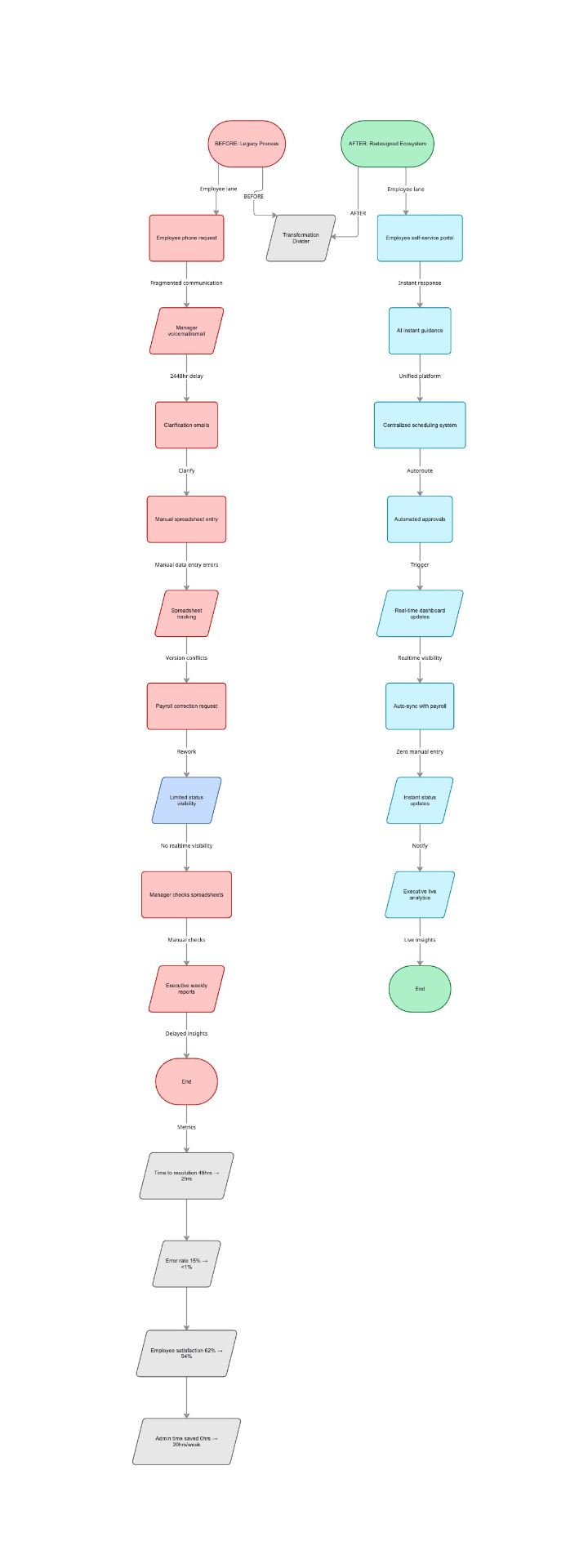
Before and after workflow comparison showing the legacy fragmented process versus the redesigned ecosystem with measurable improvements in resolution time, error rate, satisfaction, and admin time saved
Before & after — legacy process vs. redesigned ecosystem

09

Designing systems, not screens.

Reflection

This project fundamentally changed how I think about enterprise software design. Rather than focusing solely on individual screens or user flows, I learned how to design systems that support multiple user groups, interconnected workflows, and organizational goals simultaneously.

The experience reinforced the importance of balancing business constraints, operational realities, and user needs while creating products capable of scaling across large and complex organizations.

Next case study

Diagnoss

Continue →